With the Income-tax Act, 2025 now in full effect, the way we report TDS has changed. The Income Tax Department has replaced multiple TDS forms with a single integrated Form 141.
The Income Tax Portal has also been redesigned to align with the new Act, therefore it’s important to understand the updated filing process. Form 141 is divided into four schedules, each covering specific payments such as rent, property purchases, professional fees, etc.
In this thread, we’re focusing specially on Schedule C, which applies to TDS payments to contractors or professionals.
Who needs to file Form 141 (Schedule C)?
You must file if you are an individual or HUF who is not liable for tax audit, and only if the payments to a single contractor or professional exceed ₹50 lakhs during the tax year. Also, the payment must be made to a resident contractor or professional for:
- Contractual work: Interior decoration, catering, repairs, etc.
- Professional services: Legal, medical, engineering, architectural, etc.
- Commission or brokerage: Except for insurance commission.
Before we dive into the filing steps, you might want to check out What is Form 141? TDS return for property, rent, and other specified payments to understand the basics, or check this Form 141 vs. Form 26QD comparison to see what’s changed.
Here’s how to get started with filing TDS on contractual and professional payments with Form 141:
- Log in to the Income Tax e-filing portal

- Navigate to e-File > e-Pay Tax

- Select Income-tax Act, 2025 > Continue

- Click on New Payment button to initiate the TDS reporting process

- Select the Form 141 tile > Proceed

- Now, choose your Deductee Type based on the service provider/professional you are paying > Continue
Select Corporate deductee if the professional/contractor is a company.
Select Non-Corporate deductee if they are an individual or a partnership firm.

Note: You can include multiple deductees in a single Form only if they all have the same deductee type. So if you are paying both a company and an individual, you must file two separate Form 141s.
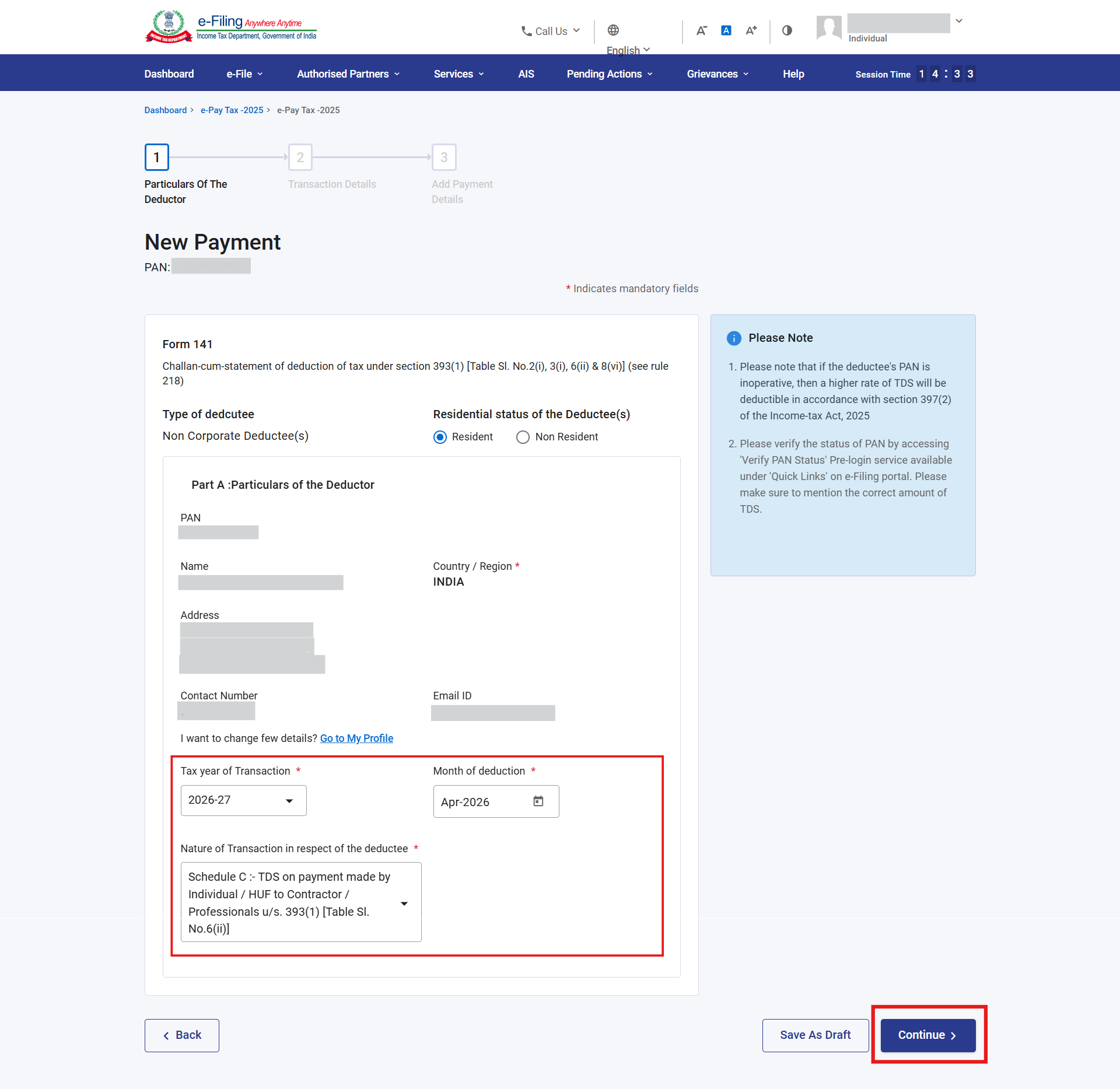
- Here you’ll see that your basic details will be pre-filled. Now you need to specify:
- Transaction Year: Select the tax year in which the payment was made.
- Month of Deduction: The month you paid the professional or credited the amount to their account.
- Nature of Transaction: Select Schedule C: TDS on payment made by individual/HUF to contractor or professionals from the dropdown menu > Continue
- Now, enter the Payment and Transaction Details in Part B of the form.

- Review the Tax Deposit summary > Continue to proceed with the TDS payment

- Select your preferred payment mode (Net Banking, UPI, or Debit Card) and pay the TDS
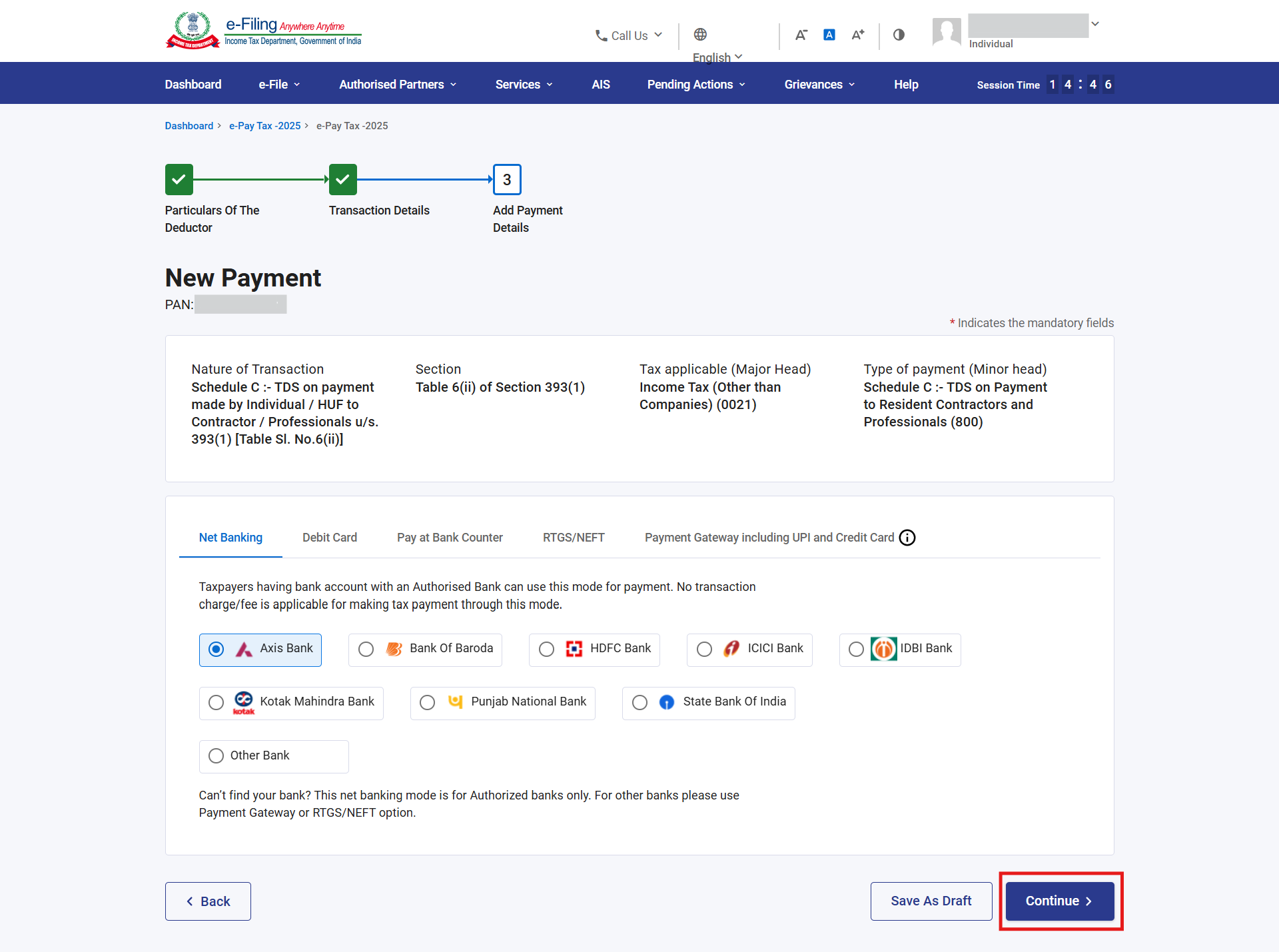
Next, carefully preview the details of the entire form and complete the payment.
Once the payment is successful:
- A Challan Receipt will be generated. You must download and save it, as it includes your BSR Code, Date of Payment, and Challan Serial Number as proof of payment.
- Since this is an integrated form, the portal will also generate a Form 141 Acknowledgement. Also save this for future reference, especially for any corrections.
After 4–5 working days, log in to the TRACES portal to download Form 132 (TDS Certificate). You are required to provide this certificate to the service provider, as it serves as their proof of tax deposited.
Got questions or stuck at any step? Drop them below, we’ll help you out!